Feature
See what the crew saw
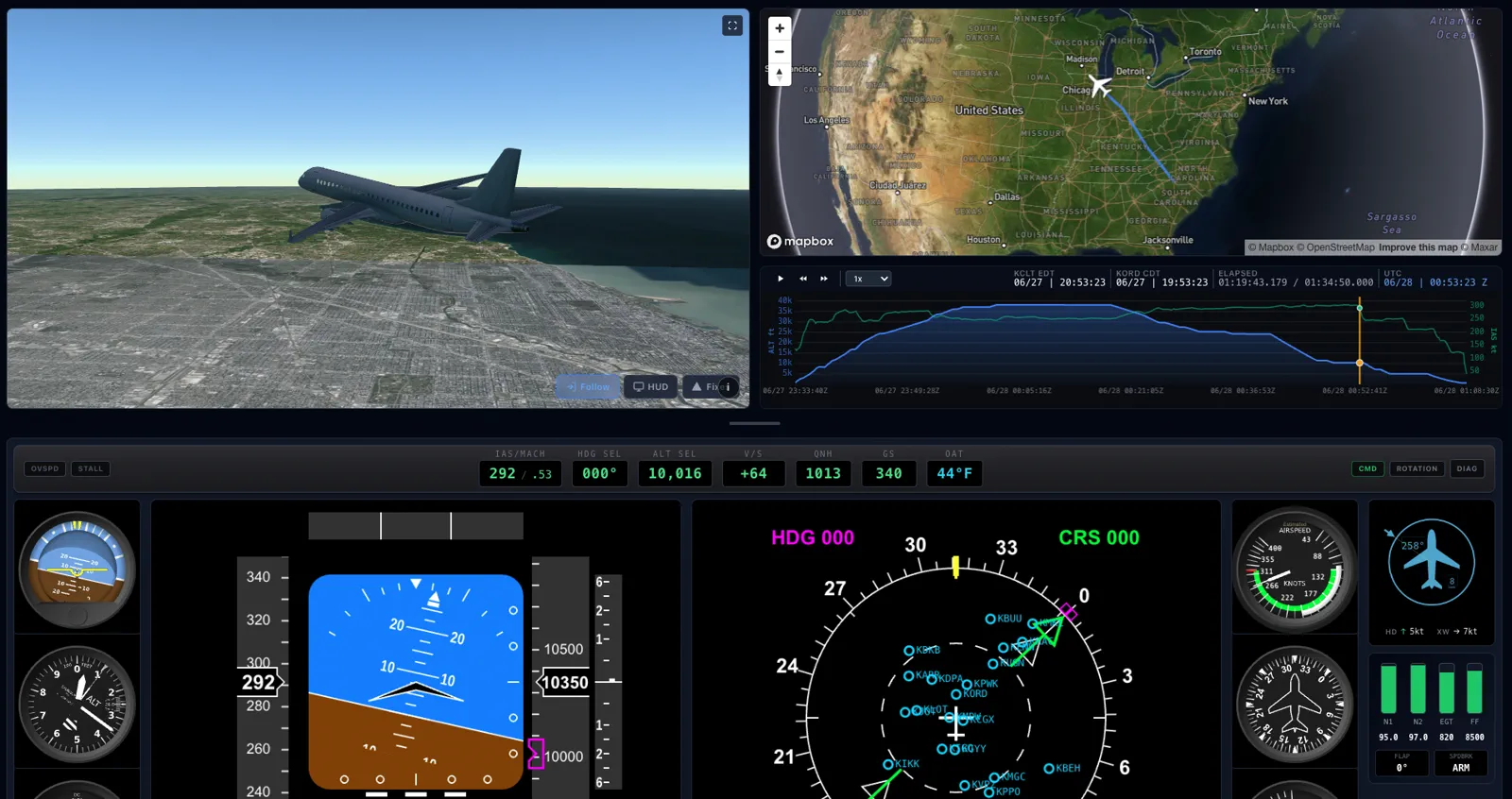
A full instrument panel and 3D terrain context on top of every replay. Scrub to any second and read real attitude, airspeed, and vertical speed.
 LIVE
LIVE
A track line tells you where an aircraft was. SkyMeter tells you how it was flying. On top of every replay sits a full instrument panel (airspeed, altitude, vertical speed, attitude indicator, heading, and turn coordinator) driven by derived pitch, bank, and heading, not just a moving dot.
Pause on any second and the whole picture holds still for you: the attitude, the speed, the terrain closing in on approach. Indicated airspeed and Mach are corrected for compressibility and ISA conditions, so the numbers reflect what the crew would have read, not raw GPS ground speed.
Why it matters
Real attitude, not just position
Derived pitch, bank, and heading drive a live attitude indicator so you can see how the aircraft was actually oriented.
Crew-referenced speeds
Indicated airspeed and Mach are corrected for compressibility and ISA, closer to what the flight deck saw than ground speed.
Inspect any single second
Scrub, pause, and step through the flight; the full instrument stack updates in lockstep with the 3D view.
What you get
- Full six-instrument panel (ASI, attitude, altimeter, VSI, heading, turn coordinator)
- Derived pitch, bank, and heading reconstruction
- Compressibility- and ISA-corrected IAS and Mach
- 3D terrain context around the aircraft at every moment
- Actual weather on the navigation display: wind, cloud, and ground/satellite radar for the flight's time and place
- Frame-accurate scrub, pause, and slow-motion
- Instruments, map, and 3D view all synchronized
How it works
SkyMeter derives attitude and true/indicated airspeed from the reconstructed trajectory and the atmosphere of the day, then drives standard flight instruments from those values.
What's measured versus inferred, and how the reconstruction is done, is spelled out on the event-detection methodology page, linked below.
How attitude & airspeed are reconstructedWho it's for
Pilots
Study attitude and energy through a maneuver or approach the way you'd read it on the panel.
Safety analysts
Correlate instrument state with the flight path to understand how a moment developed.
Instructors
Freeze a second of a real flight and talk through exactly what the instruments were showing.
Frequently asked questions
Is this the aircraft's real instrument data?
No aircraft broadcasts its panel. SkyMeter reconstructs attitude and airspeed from the flight path and the day's atmosphere: a faithful estimate of what the crew saw, clearly framed as reconstruction, not recorder truth.
Why is airspeed different from ground speed?
Because SkyMeter corrects for air density and compressibility to estimate indicated airspeed and Mach, the speeds the crew actually flew, rather than showing raw GPS ground speed.
Which instruments are shown?
A standard six-pack: airspeed indicator, attitude indicator, altimeter, vertical speed indicator, heading indicator, and turn coordinator.
Does the weather on the navigation display show the pilot's radar picture?
No. The navigation display shows the ACTUAL weather for that time and place, from ground weather radar (NEXRAD) and satellite imagery in meteorological records. It is not a recreation of the aircraft's onboard weather radar or what the crew saw out the window. It's the real conditions the flight passed through, matched to its position and time.
Does it work on any flight?
Yes. The instrument overlay is generated for every reconstructed flight in the archive.
Explore more capabilities
Ready to see it on a real flight?
Start free with the last 7 days, or unlock the full archive and exports with Pro.